Before you start: what to gather
Gather these before you log in.
- Your TIN and IRD PIN. If you cannot get in, our RAMIS login guide covers the sign-in screen, PIN requests and lockouts. If you have no TIN at all, start with TIN registration.
- Your employer’s withholding certificate for employment income, showing your remuneration and the APIT deducted. Your employer must give it to you by 30 April following the year of assessment, or within 30 days if you left partway through the year. Many employers still call this the T-10.
- AIT and WHT certificates from your bank and from anyone else who withheld tax on payments to you. A withholding agent has to issue one, and the Act expects withholding certificates to be attached to your return.
- Bank interest statements for every account, matched against your AIT certificates.
- Rent records, if you had rental income.
- Records of foreign-currency income, if any: what you were paid, in what currency, and the bank remittance to Sri Lanka.
- Business or freelance income and expense records, if applicable.
- Details of any capital asset sales during the year. These go on a separate capital gains return, not this one.
- Asset and liability figures as at 31 March 2026, for the Statement of Assets and Liabilities. The Commissioner-General can require it, and IRD’s guide says the values are not used to compute your tax.
Tip: work out what you owe before you start, so you can sanity-check the portal’s figure — use the income tax calculator.
Filing online, step by step
-
Log in to IRD e-services.
What you see: the RAMIS login page at eservices.ird.gov.lk.
What to enter: your TIN and your IRD PIN, plus the captcha. Full detail on that screen is in our RAMIS login guide.
Common mistake: using your NIC number in place of your TIN.
-
Open your return.
What you see: a top menu. Select Return / Schedule Management, then Individual Income Tax (IIT).
What to enter: choose the year of assessment 2025/26 and click Proceed.
Common mistake: picking the wrong year. This return covers income earned from 1 April 2025 to 31 March 2026. If Individual Income Tax is not listed at all, that means you are not yet registered for that tax type, and you request registration under the Taxpayer Registration tab. If the tax type is there but the year is not, use the Return issuance tab.
-
Declare your income sources, which decides your return type.
What you see: checkboxes for your sources of income for the year. Your selection sends you to either the Standard Return or the Simplified Return.
What to enter: tick every source that applies, then Next. The Simplified Return is available for primary employment income, secondary employment income, income from residential solar panel installations, interest income where AIT was deducted by a licensed bank or financial institution, any two or more of those, or a nil return.
Common mistake: expecting the Simplified Return when you have qualifying payments or relief deductions beyond personal relief. Those taxpayers must use the Standard Return. Note that the Simplified Return pre-fills some fields from data IRD already holds, and it is still your responsibility to check them.
-
Enter your employment income (Schedule 1).
What you see: Schedule 1, Employment Income.
What to enter: your remuneration and terminal benefits, from your withholding certificate. If you had more than one employment during the year, use the additional rows.
Common mistake: entering net pay instead of gross remuneration, or leaving out a job you left partway through the year.
-
Enter your other income, schedule by schedule.
What you see: Schedule 2 Business Income, Schedule 3 Investment Income, Schedule 4 Other Income, Schedule 6 for WHT on final withholding payments and Schedule 7 for AIT and withholding tax.
What to enter: gross income in the income schedules, and the tax already withheld in Schedule 7 so it is credited. Schedule 5 is where qualifying payments and expenditure relief go.
Common mistake: netting withheld tax off your income instead of declaring gross income and claiming the withholding separately. That understates both your income and your credit.
-
Check your reliefs.
What you see: the relief figures on the main return, fed by the schedules.
What to check: that the Rs 1,800,000 personal relief for Y/A 2025/26 has come through. If you had rental income, the relief of 25% of total rental income is claimed through Schedule 3.
Common mistake: not looking at this screen at all. Check the figure before you move on.
-
Review the computation (Schedules 8, 9 and 10).
What you see: Schedule 8 Tax Calculation, Schedule 9 Tax Credits and, if you have losses, Schedule 10 Loss Adjustment. The main return’s cages are calculated from the schedules.
What to check: every figure against your own records, and in particular that each withholding certificate appears as a credit in Schedule 9.
Common mistake: submitting without checking the credits, then paying tax you had already paid.
-
Save your copy, then submit.
What you see: a confirmation page showing everything you have declared.
What to do, in this order: print the confirmation page or save it as a PDF first, then submit. IRD is blunt about why: after submission you are not allowed to view, print or edit the return. If something is wrong on that page, use the Amend button to go back rather than editing there. You can attach supporting documents with the Upload Supporting Documents button now, or submit now and add them later.
Common mistake: submitting first and then looking for a copy of the return.
Or skip the manual typing — the LankanTax Chrome extension fills the IRD e-services fields for you.
See the Chrome extension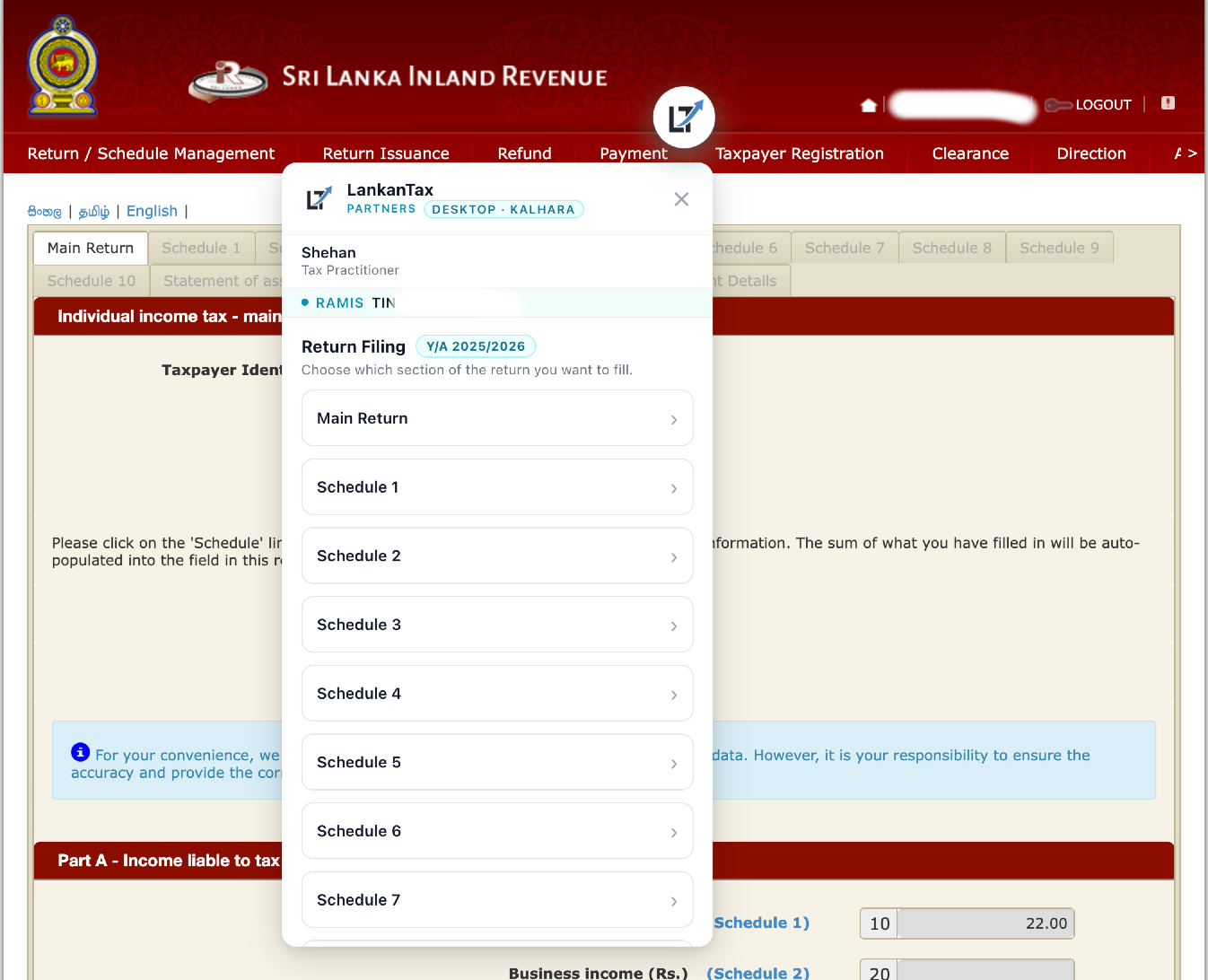
Filing notes by income type
- Salary and APIT. Report your remuneration and the APIT deducted in Schedule 1. If your only income is employment income and your employer deducted APIT in full, you generally do not need to file, but the Commissioner-General can still require a return by notice, and you may choose to file anyway. Full detail: Income Tax in Sri Lanka.
- Interest and AIT. Enter your gross interest as investment income and claim the AIT on your certificate as a credit. Do not report only the net amount you received. Full detail: Withholding Tax in Sri Lanka.
- Rent. Report gross rent. A relief of 25% of total rental income from an investment asset is available, and it applies only to the extent you have not claimed actual repair, maintenance or depreciation costs on the same asset. Full detail: Withholding Tax in Sri Lanka.
- Freelance and foreign-currency income. From 1 April 2025 an individual’s gains and profits are taxed at a maximum rate of 15% where the income comes from a service rendered in or outside Sri Lanka to be used outside Sri Lanka, the payment is received in foreign currency, and it is remitted through a bank to Sri Lanka. The same 15% cap applies to foreign-source income earned in foreign currency and remitted through a bank to Sri Lanka. Miss either condition and the normal 6% to 36% bands apply. Full detail: Foreign Income Tax in Sri Lanka.
- Capital gains. Gains on realising an investment asset are taxed at 10% and go on a separate capital gains tax return, due within thirty days after the end of the calendar month in which the realisation occurred. They do not push your other income into a higher band. Full detail: Capital Gains Tax in Sri Lanka.
After you file
- Your copy of the return: the confirmation page you printed or saved in Step 8 is your record. You cannot view, print or edit the return after submission.
- Paying a balance: the final income tax payment for Y/A 2025/26 was due on 30 September 2026, two months before the return itself. IRD’s Payments and Refunds page covers two routes: the Online Tax Payments Platform (OTPP) and payment by paying-in slip. The portal’s View Payment Voucher Number service gives you the paying-in slip, voucher or DIN number you need. Paying late carries its own penalty of 20% of the tax due but unpaid.
- Refunds: for a resident individual, a refund claim of no more than Rs 180,000 for a year of assessment from 1 April 2025 must be paid within three months of the claim, before any audit. Larger claims are not covered by that guarantee. For years of assessment from 1 April 2024, a claim has to be made within 30 months of the last date of the year of assessment.
- Correcting a mistake: you do not simply refile. You apply to the Commissioner-General to amend your self-assessment, stating the amendments and the reasons, within 12 months of the date you filed the return. If you get no decision within 90 days, the application is treated as refused, which then opens the normal review route.
- Records: keep your certificates and workings for at least 5 years (longer if an assessment or dispute is still open). The IRD can request supporting documents later.
Late filing
The return for Y/A 2025/26 is due on 30 November 2026, eight months after the end of the year of assessment.
If you file late, the penalty is the greater of two amounts:
- 5% of the tax owing, plus a further 1% of the tax owing for each month or part of a month the failure continues; or
- Rs 50,000, plus a further Rs 10,000 for each month or part of a month the failure continues.
The total is capped at Rs 400,000 for any one return. The second limb is the one to watch, because it does not depend on how much tax you owe: a late return can cost Rs 50,000 even if your tax bill is nil. If you have a genuine reason, the Commissioner-General may reduce or waive a penalty where you show reasonable cause.